Handyman website examples, and a template with your name on it
By ProLicensed · Published 23 November 2026
A handyman website has a different job from a plumber’s or a roofer’s. The work comes as a list of small jobs, customers want to know who is coming into their home, and what you may advertise depends on your state’s licensing rules. Below are four handyman website designs and what each page needs. They are ProLicensed designs and we sell them, so weigh our view accordingly.
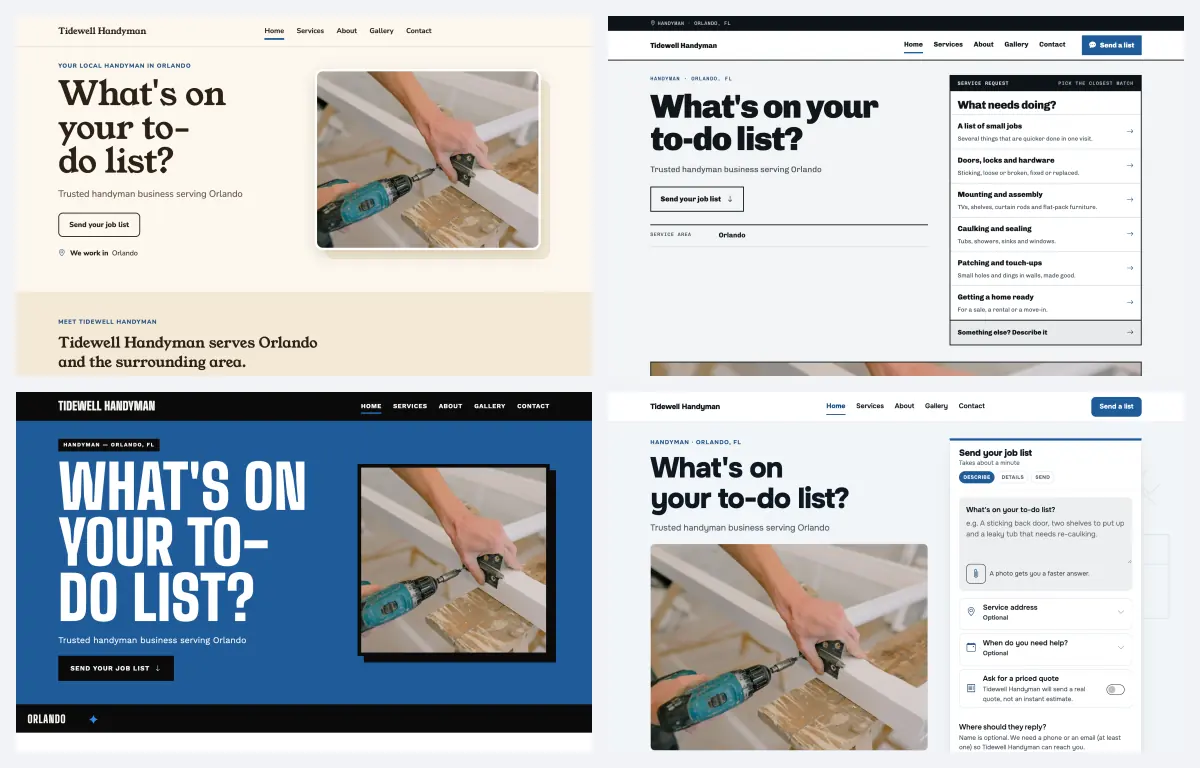
What a handyman website has to do
- Take the whole list. One call usually turns into several jobs. A form that asks “What’s on your to-do list?”, with a photo of each job and the address, lets you plan the visit and bring the right parts the first time.
- Say which jobs you take. Name the everyday work: doors and locks, mounting and assembly, caulking and sealing, patching and touch-ups, getting a home ready for a sale or a move. A visitor should find their job without calling to ask.
- Show who is coming to the door. Customers let a handyman into their home, so your name, a photo of you and reviews from past customers matter more than a slogan.
- Say where you work. The towns or neighborhoods you cover, written out.
Four designs that suit handyman work
These four are the ones we offer a handyman first. Which one fits is our view, and you can switch later:
- Neighbor. Warm and personal: who you are, what you do and what customers say. Suits a one-person business that wins work on trust.
- Dispatch. The common jobs as a list to pick from, next to your hours and service area. Suits a handyman who takes a lot of repair calls.
- Signboard. Big type and strong color, easy to read on a phone. Suits a business people find by its truck or yard sign.
- Estimate Desk. The job list form in the first screen. Suits a handyman who prices every visit before going out.
All eight designs, for every trade, are in the contractor website examples guide.
What each page needs
- Home. Your name, the jobs you do, where you work, and a button to send a job list.
- Services. Small home repairs, door and lock repair, furniture assembly and TV mounting, caulking and sealing: one line each on what you do.
- About. Who you are, how long you have been doing this, and whether you are insured.
- Gallery. Before-and-after photos of small jobs. A rehung door or a clean bead of caulk shows the care better than words.
- Reviews. Real ones, from real customers.
- Request form. The list, a photo for each job, the address and when it needs doing. The estimate request form guide covers which questions to ask.
Licensing and what your website may say
Many states let someone without a contractor’s license do small jobs, but the limits differ, and some of them are about advertising, which includes your website. Two examples:
- California. Since January 2025, an unlicensed person may take jobs under $1,000 (up from $500), counting labor and materials, if no building permit is needed and they hire no workers. An advertisement for that work must say the person is not licensed (Contractors State License Board).
- Florida. Minor work under $2,500 is exempt from licensing, but not for anyone who advertises as a contractor, and not when a larger job is split up to get under the limit (Florida Statutes s. 489.103).
Our advice: check your own state’s licensing board before you publish. Don’t call yourself a contractor or licensed unless you are, list only the work you may legally take, and say plainly when a job needs a licensed trade. This is general information, not legal advice. On a ProLicensed site the word “licensed” and a license line appear only when a license is on file; otherwise the site says “trusted” instead.
A template with your name on it
The examples above are one click away with your own business in them: enter your business name, pick Handyman and your city, and the preview draws these designs for you, free, with no card and no account. If you go ahead, plans start at $49 a month and we build the site once the payment is confirmed. The handyman website page shows how job lists arrive, and how much a contractor website costs compares the other options.
The examples are ProLicensed designs, and we sell them, so weigh our view accordingly. The business in the pictures is made up; the preview at the end puts your own name on the same designs.
See it for your own business
Preview a ProLicensed website with your business name and trade. Free preview in about a minute · no card, no account.
Preview your websiteKeep reading
- Contractor website examples: what a one-person business needs on each pageEight contractor website designs shown with sample businesses: what each puts first, which trade it suits, and what each page of a small site needs.
- How to get handyman jobs when you are starting outWhere a new handyman's first jobs come from: people you know, a free Google profile, repeat clients, and apps, with what each app charges you.
- How to get a handyman license in Florida, and what you can do without oneFlorida has no state handyman license. What the under-$2,500 exemption covers, which jobs need a license, local business tax, and how to get licensed.
If you're a contractor
We publish what we have worked out about how contractors actually get work — what leads cost, and why most contractor websites don't produce any.